
The information monitoring system has many setting items for monitoring servers, collecting information, and alert mechanisms,
mainly to provide more practical management and application for monitoring servers.
To avoid the situation where alerts are ignored due to excessive alerts,
the monitoring system usually does not re-issue alerts when the alert is not cleared yet.
However, sometimes it is necessary to issue continuous alerts, such as when an external file or program is added,
or when the system finds more than one anomaly, it needs to notify the maintenance personnel to handle it.
In the WATCHDOG system, you can use the switch function to decide whether to enable the continuous alert function.
※Not all system functions support this feature
The continuous alert switch is as follows:
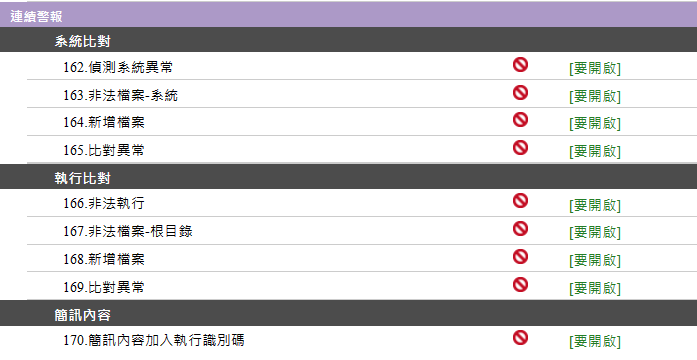
Under the major item of continuous alerts, the initial settings of 【System Comparison】, 【Execution Comparison】, and 【Message Content】 are generally not enabled.
If you need the function of continuous alert notifications, please click the [Enable] link behind to activate it.
The items under these major items are as follows:
➣System Comparison: Detect system anomalies, illegal files - system, new files, comparison anomalies
➣Execution Comparison: Illegal execution, illegal files - root directory, new files, comparison anomalies
➣Message Content: When the system sends a message, it will add an identification code,
to assist maintenance personnel in remotely operating certain programs, these identification codes can be used to judge the message
When the system administrator considers it necessary to enable continuous alerts, they can set and adjust it in the continuous alert function.
Scheduled Comparison Settings
【Scheduled Comparison】 is mainly for the needs of the information environment and maintenance personnel,
using this function to select and adjust the time of comparison to avoid causing excessive load or incorrect comparison on the system at the wrong time,
and to assist maintenance personnel in handling fixed processes.
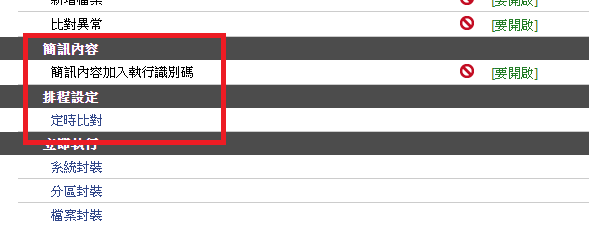
In the application of the scheduled comparison function, it is recommended that the server update time be fixed.
After each update, perform packaging first, and then use this scheduled comparison function,
set the recommended time for comparison.
This entire scheduling setting can help maintenance personnel handle many fixed tasks,
and is one of the important functions for system information automation.
【Immediate Execution】 of Necessary Procedures from the Maintenance System
The 【Immediate Execution】 function in server management allows maintenance personnel to immediately select and execute the following functions:
including system packaging, partition packaging, file packaging, system comparison, and execution comparison.
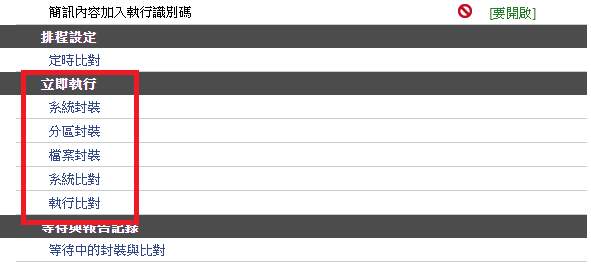
➣System Packaging: Package the entire operating system.
➣Partition Packaging: Package the specified source file directory.
➣File Packaging: Add the specified program file to the 【Target System】 package.
➣System Comparison: The system will regularly or at set times perform a 【Comparison System】 on 【System Packaging】, 【Partition Packaging】, and 【File Packaging】.
If the content of the target program or file in 【System Comparison】 changes, an alert notification will be issued.