
In today's information age, a proactive and efficient IT operation and maintenance system is crucial for ensuring system stability.
The WATCHDOG system can instantly detect and automatically alert on abnormal conditions, enabling the maintenance team to respond swiftly.
This section will explore in depth the design concepts and implementation details of the WATCHDOG system's alarm functions from multiple perspectives,
demonstrating how our design team comprehensively considers various factors to ensure that the system's design philosophy aligns with the current environment.
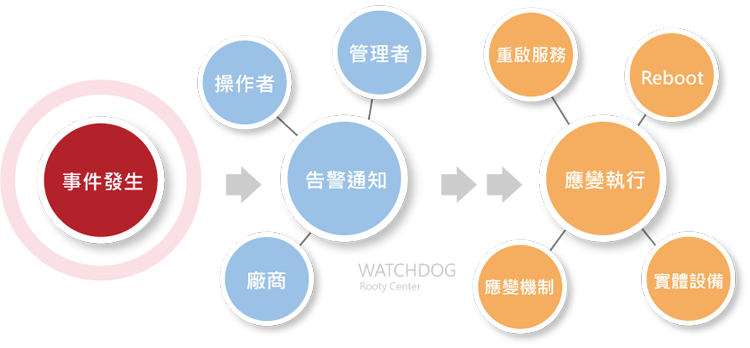
Definition of Abnormal Conditions
First, we need to define what constitutes an "abnormal condition". This includes detection based on various data benchmarks, such as data, string content, and event triggers.
Setting Alarm Thresholds
Alarm events are triggered based on predefined "alarm thresholds". This requires clearly defining these thresholds and the response plan when these thresholds are met.
Establishing Monitoring Targets
Effective alarm mechanisms start with clear monitoring target settings, including:
➢ Items that need to be monitored
➢ Defining the abnormal thresholds for monitored items, the most common types include:
➥Data type: using greater than (>) or less than (<) to define "alarm thresholds"
➥Text type and message type: using string comparison and logical operations to determine if an alarm should be triggered
➥Event trigger type: immediately issuing an alarm upon receiving specific messages
Other Key Points for Alarm Notification
➢ Assessing the efficiency, rigor, and sensitivity of alarms
➢ Setting alarm transmission channels and notification lists
➢ Emergency response plans after alarms
➢ Establishing important correlation points, such as routing tracking for packet tests
➢ Establishing information related to monitoring, including equipment location, purpose, custodian, and maintenance vendor, etc.
Rigorous and Flexible Abnormal Detection Mechanisms
Balancing appropriate alarms is crucial in maintaining an efficient IT operation and maintenance system.
Too many irrelevant alarms can cause the maintenance team to ignore genuinely important alarms, like the boy who cried wolf.
To avoid this, we need a rigorous yet flexible abnormal detection mechanism to accurately identify and address real issues.
Below are the strategic concepts we designed when developing WATCHDOG
Refined Abnormal Detection Rules
When the detection system needs to determine if an event is abnormal, at least three conditions must be met before issuing an alarm,
and must be set according to the characteristics and usage importance of each type of equipment.
➢ Data conforming to single function usage
➢ Repeated detection multiple times
➢ Delayed re-detection time after an abnormality to reduce overreaction
➢ No alarm notifications during specific periods to avoid interference during non-critical times
➢ Define specific alarm values based on the details of each monitoring target
Not all monitoring items have the same alarm conditions and thresholds
Even for the same IT equipment and the same monitoring items,
alarm thresholds and responses must be defined according to the system characteristics or usage characteristics of the IT equipment and monitoring items.
➢ Each monitoring detail provides independent alarm detection conditions and thresholds, including data, strings, event triggers, etc.
➢ Set delay time and the number of re-tests, and for specific periods, further set time interval conditions
➢ Set independent notification groups and follow-up processing mechanisms for each monitoring detail
For example: automatically issue commands to the equipment after issuing an alarm
Improving Efficiency and Knowledge Transfer
Automated alarm detection mechanisms provide great assistance to system managers or maintenance personnel. It not only saves a lot of time checking system status,
but more importantly, it establishes standards for alarms and ensures the transfer of knowledge.
➢ A tested alarm detection condition covering various status messages and data, if it can integrate standard values and experiences of system load and data anomalies into standard specifications, will greatly promote knowledge transfer and application.
➢ When setting alarm thresholds, start with a system health check to understand the system's operating status, thereby precisely adjusting alarm values.
➢ Avoid relying on single condition triggers for alarms, unless in specific situations, such as alarm forwarding or proxy alarm notification.
Strategy Cases for Alarm Detection
➢ Alarm Detection with Single Condition Value
If the monitoring system only issues alarms based on a single condition, such as issuing an alarm when CPU load exceeds 80%, it may lead to many invalid alarms. Particularly during high-load operations,
such as backup periods, alarm messages may continuously appear, causing interference.
➢ Alarm Detection with Multiple Condition Values
Using multiple conditions for alarm detection, such as CPU load exceeding 80%, being repeatedly detected for three consecutive times, and each re-test interval being 5 minutes, only issuing an alarm when these conditions are all met.
Additionally, setting specific periods when no alarms are issued can reduce unnecessary interference.
➢ Adjusting Alarm Conditions Based on System Usage Characteristics and Environment
This can more accurately identify real system problems, emphasizing that alarm settings need to consider the actual operating status and characteristics of the system, rather than relying solely on a single data point.
For example, among two server hosts, one has a CPU load of 95%, and the other has a load of 12%. Which one has a problem?
A CPU load of 95% may seem problematic,
but if it has always operated normally without any downtime or slowdowns, while the other one normally has a load of 68% but drops to 12%,
if it's because some services stopped, causing the CPU load to drop from 68% to 12%, which server has a problem?
Well-Planned Notification Groups
For setting up the "notification list", it must be capable of handling different "equipment groups" and "responsible groups", and even "specific groups",
including system managers, maintenance personnel, maintenance vendors, and information center supervisors.
Other key points to consider in notification group design:
Event Occurrence and Resolution Notification
According to the pre-set notification list, when an alarm event occurs or is resolved, the system can automatically notify system managers, maintenance personnel, maintenance vendors, and professional technical engineers based on user-defined notification groups.
Diverse Notification Group Settings
The notification list must be able to meet the needs of different equipment groups, responsible groups, and even specific groups, including system managers, maintenance personnel, maintenance vendors, and information center supervisors. Each notification group should be able to establish more than 30 lists, setting specific notification targets for different alarm events.
Flexible Alarm Conditions and Notification Methods
Under the alarm conditions of each monitoring item, specify specific notification groups, and based on the characteristics of the groups, select appropriate notification channels, such as SMS, email, etc., to issue alarm messages and optionally activate linkage control commands.
Detailed Selection of Notification Groups
The notification group list can be subdivided to single monitoring items, such as different hard disk usage rates or CPU loads of the same server, ensuring precise delivery of alarm messages.
Alarm Message Release Strategy
Alarm messages are sent based on the specific details of the monitoring items, choosing the notification group list accordingly, and following the set priority, from the most specific monitoring items to the overall shared list, to avoid sending duplicate alarm messages.
Classification of Notification Group Categories
The notification group list is classified by different categories, such as monitoring items, equipment entities, specific groups, systems and equipment, system startup, scheduled SMS tests, overall shared lists, etc., to meet various monitoring needs.
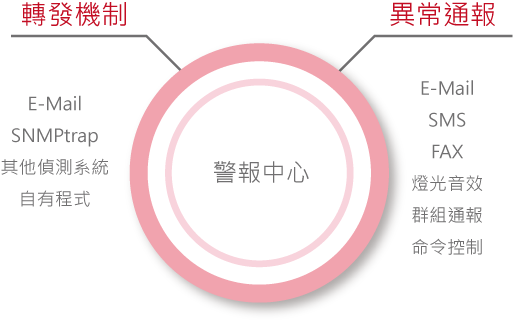
Flexible Customized Notification Strategies
The WATCHDOG system supports the simultaneous delivery of alarm messages through multiple channels. Users can set the alarm delivery method based on actual needs and can update the notification group list at any time to ensure message transmission.
Combining control commands with alarm messages, in addition to basic alarm notifications, WATCHDOG also supports the simultaneous use of control-type functions, such as emergency or one-click shutdown commands, suitable for sound broadcasting or alarm lights.
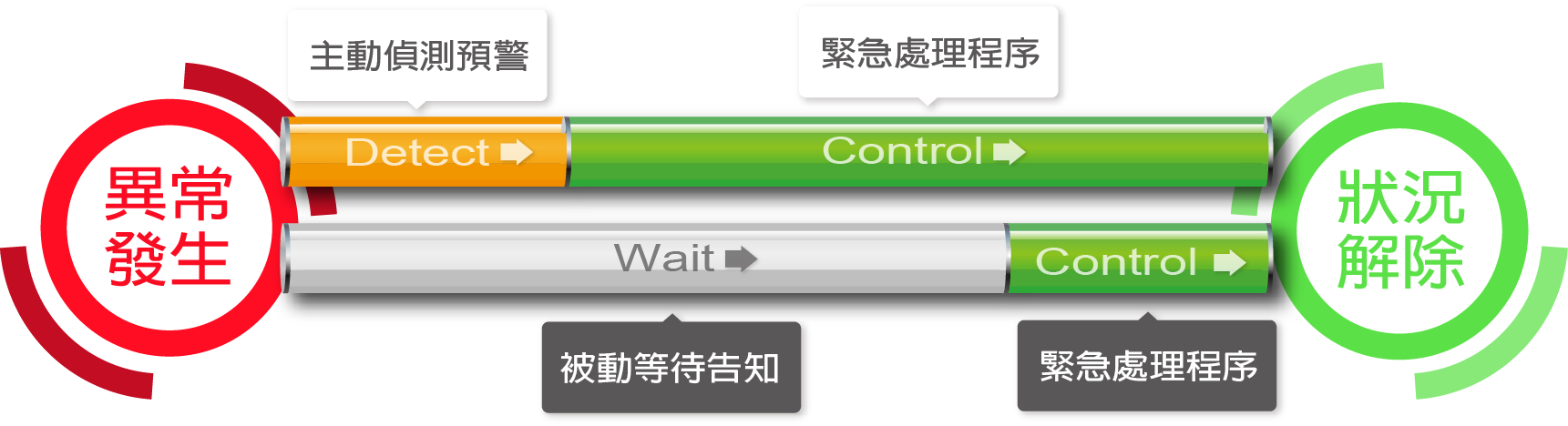
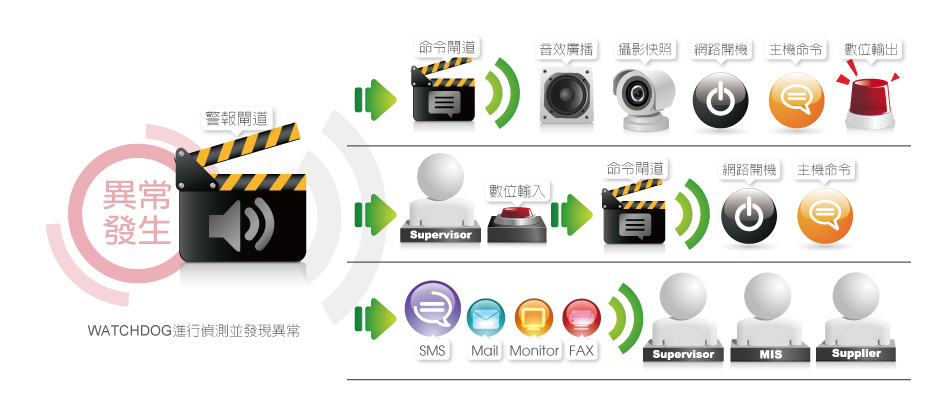
Alarm Messages Can Be Delivered Through the Following Channels
➢ Displayed on the real-time information command center monitoring screen
➢ SMS (Short Message Service)
➢ Email
➢ LINE messages
➢ Telegram messages
➢ Forwarding SNMP Traps
➢ Fax
➢ Sound broadcasting
➢ Digital control (DO), such as alarm lights, sirens, power switches
➢ Network boot
➢ Tag gateway (for SMS commands)
➢ Message client integration
Message Integration
When the user unit has established an Enterprise Information Portal (EIP), it can integrate alarm messages into the EIP push system or instant messaging system as needed, such as Line.
If there are other operation and maintenance management platform systems, alarm information content can also be provided through mutually recognized data protocols.
Alarm Linkage Control Commands
When an alarm event occurs, WATCHDOG can not only notify maintenance personnel, maintenance vendors, or system managers but also set up a dedicated function [Command Gateway],
treating the alarm event as an action that triggers follow-up control mechanisms, and conducting subsequent control through the [Command Gateway].
Each alarm control process can link multiple command gateways, issuing various types of commands to over 256 servers, including system commands, IPMI commands, CLI commands, etc., achieving direct command issuance to server hosts, specific equipment, or controlling power equipment and one-click operations.
For more details on the [Command Gateway] function, please refer to the article [Command Gateway].